
A Kubernetes backup strategy has to cover more than YAML. A real recovery might need Kubernetes resources, namespaces and workloads, secrets and ConfigMaps, CRDs and custom resources, persistent volume data, databases and stateful applications, cluster configuration and the dependencies between applications. Whether your storage platform supports snapshots changes the architecture more than any single tool choice does — which is why the tool question should come second, not first.
Two different backup problems
Kubernetes resource backup — Deployments, StatefulSets, Services, Ingress, ConfigMaps, Secrets, CRDs, namespaces — is the straightforward part. Most tools handle it well. The harder problem is persistent volume data, and it splits into two cases depending on what your storage supports.
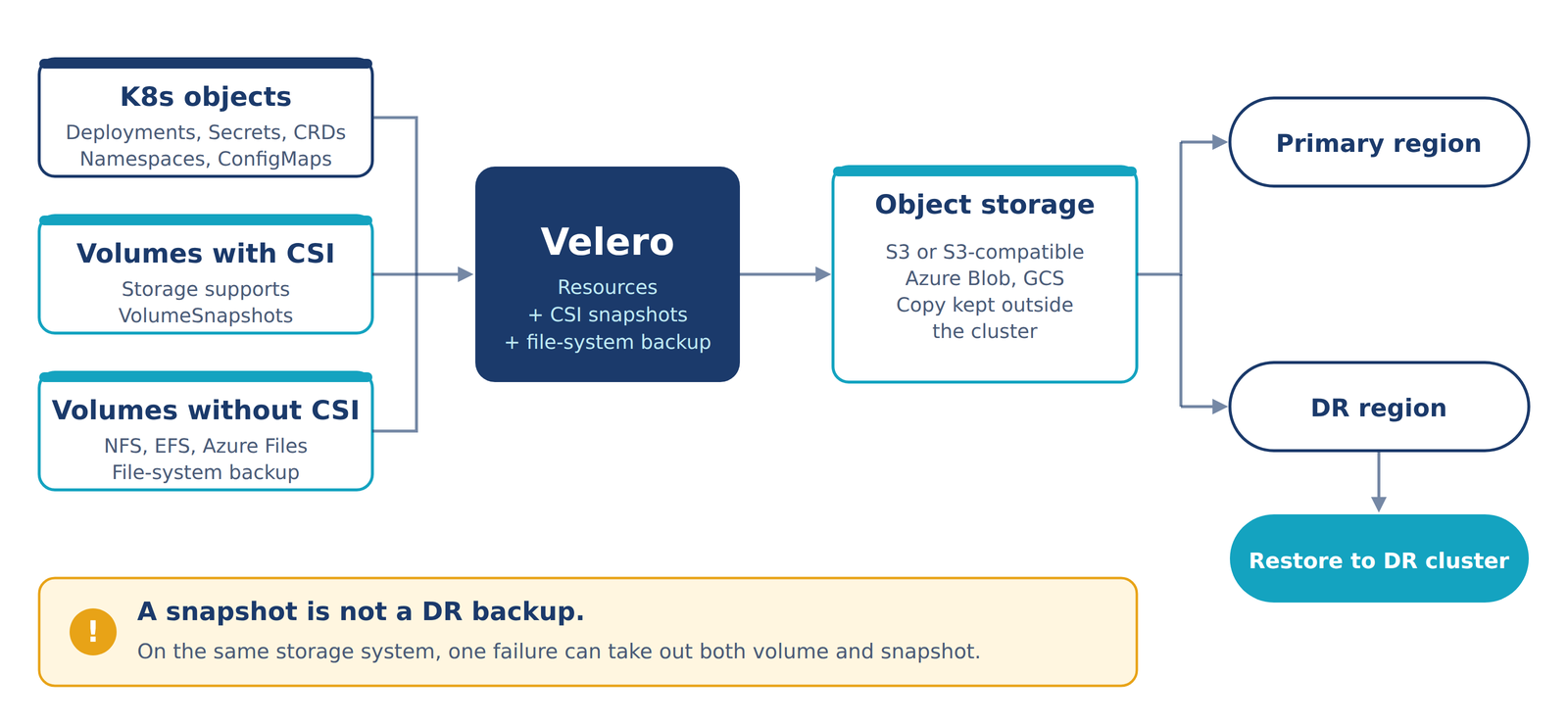
If your CSI storage driver supports VolumeSnapshot, a backup tool can use the storage system's own native snapshot mechanism — Velero, for instance, integrates with the Kubernetes CSI snapshot API and works with any CSI driver that supports it. But a snapshot is not automatically a disaster-recovery backup. If it stays on the same storage system, cluster, account or failure domain as the original volume, a storage failure can take out both at once. Where the snapshot actually lives, and how durable it is independent of the source, matters as much as whether snapshots exist at all.
For storage that doesn't support native snapshots — NFS, EFS, Azure Files, local volumes, or legacy applications — filesystem-level backup is the fallback. Velero's File System Backup copies volume data at the filesystem level specifically to cover the cases where snapshot support isn't available.
The shape of the architecture
Put together, Kubernetes resources, CSI-snapshot volumes and non-CSI volumes all feed the same backup and DR path:
Why Velero fits this model
Velero separates Kubernetes backup metadata from persistent-volume protection, rather than treating them as one thing. A Backup Storage Location holds Kubernetes backup metadata and backup data in object storage; a Volume Snapshot Location holds storage-provider snapshots — configured independently, which matters when the storage and DR strategy for metadata isn't the same as the one for volume data. And where CSI snapshots are supported, Velero uses the standard Kubernetes CSI snapshot API rather than requiring a storage-specific plugin for every provider.
What to evaluate before choosing a tool
A useful checklist, grouped by what it's actually answering:
- Recovery objectives. RPO — how much data can you afford to lose? RTO — how fast does the application need to be back?
- Coverage. Does it correctly handle CRDs, operators, secrets and cross-resource dependencies — and back up databases and stateful applications in an application-consistent way, not just volume-consistent?
- Snapshot support and durability. Does your storage platform support CSI snapshots, and are those snapshots independent of the primary storage's failure domain?
- Storage and geography. Can backups land in S3, S3-compatible storage, Azure Blob or GCS — and survive a full region failure, not just a node or cluster failure?
- Restore path. Can you restore into a different cluster, and — this is the one teams skip — can restore be tested automatically, not assumed to work?
- Security and cost. Encryption, IAM, credential handling and backup immutability on one side; on the other, backup storage plus snapshot storage plus data transfer plus API requests plus retention plus the operational cost of running it, not just the storage line item.
Choose the architecture first
The sequence that actually works is: decide what needs to be recoverable and how fast, then check whether a given platform covers Kubernetes resources, CSI snapshots, filesystem backup, object storage, cross-cluster restore and application consistency together — not pick a tool and hope it fits. Velero is a reasonable foundation for a lot of cloud-native environments precisely because it treats resource backup, CSI snapshots and filesystem backup as parts of one model instead of tying the whole strategy to a single storage platform. But the right answer still depends on your RPO/RTO, storage platform, consistency requirements, compliance and scale — and a backup nobody has restored from is just an assumption. We design backup and disaster recovery into Kubernetes platforms as part of the architecture, not as a checkbox added after the cluster is already in production.